Features
The Fastest Way to Build in Bricks
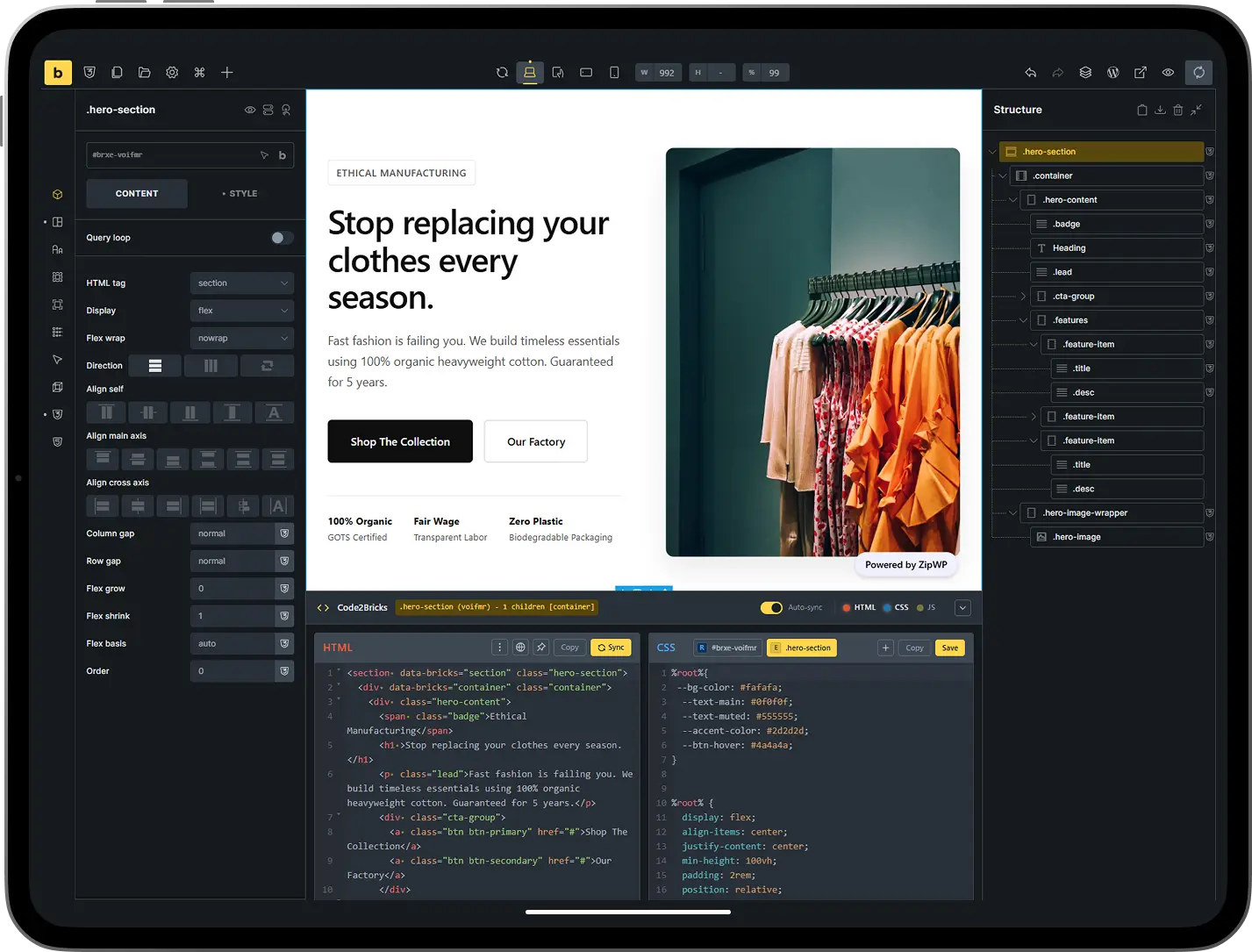
Optimize your workflow with features designed for speed. Code2Bricks replaces manual clicking with a bidirectional code editor that instantly renders your code directly on the builder canvas.
Bidirectional HTML Editor
Write standard HTML code that instantly converts into native Bricks elements like Sections, Containers, and Headings. Any structural change made in the visual builder updates your code in real-time, keeping both views perfectly synchronized.
Native JavaScript Storage
Manage scripts efficiently by writing code that is automatically saved into standard Bricks Code elements. This architecture ensures your JavaScript executes reliably on the frontend and remains fully accessible even if the plugin is eventually deactivated.
Smart Element Tracking
Move code blocks with confidence using our ID-based tracking system. Unlike position-based, this engine tracks elements by unique references, allowing you to cut, paste, and reorder code without losing element settings or breaking the layout.
Intelligent CSS Editor
Write CSS faster with an editor built specifically for Bricks. From a single, unified panel, you can target element IDs, element classes, or global classes with ease. The editor includes powerful productivity shortcuts such as a Root Selector that lets you type r + Tab to instantly insert %root%, variable autocomplete where typing --var + Tab expands to var(--var), and smart property suggestions that allow you to type back, select background, and have the editor automatically insert the colon and semicolon so you can immediately add your value.
Zero-Latency Workflow
Work without interruption using a reactivity engine that eliminates manual save or sync buttons. The system processes changes as you type, ensuring the visual canvas and code editor remain in lockstep without slowing down the browser.
BEM Class Generator
Generate clean, scalable class structures instantly. Hover over any element in the structure panel to launch the generator, which creates BEM-compliant classes for entire element trees in seconds. You can choose to create Global or Element-level classes and even edit names inline before applying them.
Framework Compatibility
Integrate seamlessly with utility frameworks like ACSS or Core Framework. Type class names directly into the HTML editor, and Bricks will immediately recognize and render the associated styles, eliminating the need to search through visual menus.
Advanced Context Menus
Right-click any class or element for precision control. Rename classes safely without breaking links, copy full CSS rules to move styles between elements, or instantly copy the selector string to use elsewhere. You can even copy the CSS of all child elements in a single click to migrate styles rapidly.
Persistent Storage
All your changes live in Bricks' native data structure. No custom tables. No orphaned data. t's clean, lightweight, and ensures your data never gets orphaned..
FAQ
Questions? We've Got Answers.
If I deactivate the plugin, does my site break?
Deactivating the plugin will not break your site or remove any content. Code2Bricks acts as a bridge that converts your code directly into native Bricks elements, CSS settings, and code blocks. All data is stored in Bricks’ standard database fields, meaning your site remains fully functional and editable through the default Bricks interface even if the plugin is removed.
Does this slow down my frontend?
Zero bloat. Code2Bricks runs entirely inside the builder. We don’t add a single line of CSS or JS to your frontend. We generate native Bricks elements, so your site loads exactly as if you built it manually, just much, much faster.
Is there a steep learning curve?
This tool is designed to be intuitive for experienced developers while serving as a powerful learning aid for those new to coding. Due to the plugin’s bidirectional synchronization, you can build visually in Bricks and immediately watch the corresponding HTML and CSS generate in the editor. This instant feedback loop helps users understand the relationship between code and visual design much faster than traditional development methods.
Does it support CSS frameworks like ACSS, AT or Core Framework?
The plugin integrates seamlessly with any CSS framework compatible with Bricks. Because the HTML editor generates native elements, you can type utility classes directly into your code, and Bricks will render the associated styles immediately on the canvas. This provides a highly efficient way to utilize utility frameworks without constantly switching between input fields.
What is included in the lifetime license?
A lifetime license grants you permanent access to the plugin with a one-time payment and no recurring fees. This includes all future plugin updates, security patches and new features.
Can I upgrade my license tier later?
You can upgrade your license at any time by simply reaching out to our support through support@code2bricks.com. We will provide you with a personalized checkout link so you only pay the difference between your current plan and the new tier. This allows you to start with a Personal license to evaluate the workflow and easily scale up to an Agency or Unlimited plan as your business needs grow.
Do visual styling controls sync with the CSS editor?
The CSS editor and the Bricks visual styling panel operate independently to ensure maximum flexibility. Bricks stores visual control inputs (such as sliders and color pickers) as internal element settings, whereas Code2Bricks writes directly to the custom CSS fields. Since free-form CSS often includes complex properties and logic that cannot be mapped back to specific UI controls, the two systems function in parallel rather than synchronizing. This allows you to use visual controls for base styling and the code editor for advanced rules without them conflicting or overwriting each other.
Build Faster with Code Where You Need It.
Code2Bricks integrates HTML, CSS, and JavaScript editors directly into Bricks Builder. Work visually when it makes sense, drop into code when it's faster. One workflow, zero context switching.